Migrating from OJS to a Modern Journal Management System: Workflow, Metadata, DOI and Archive Considerations
A journal platform migration is not simply a website redesign. It is the transfer of an active scholarly-publishing environment containing manuscript records, author information, reviewer assignments, editorial decisions, published articles, citation metadata, DOI destinations and historical archives.
If migration is treated only as a visual project, a journal may launch an attractive new website while losing important editorial information, breaking article links or publishing incomplete metadata. These problems can affect authors, editors, readers, libraries, search engines and external scholarly services.
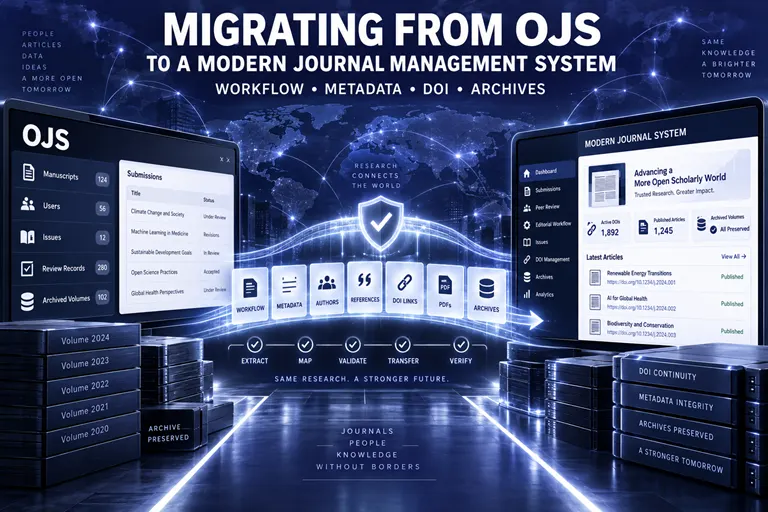
Universities, scholarly societies and independent publishers may consider migrating from Open Journal Systems when their existing installation becomes difficult to maintain, no longer supports the desired editorial experience, requires a major version upgrade or does not provide the public-facing design and workflow support they need.
Some journals may move to a newer OJS installation with professional support. Others may migrate to an integrated modern journal management environment such as ScholarJMS, which connects the journal website, online manuscript submission, editorial workflow, peer review and structured article publishing.
The Intellecta International Journal of Research and Innovation (IIJRI) demonstrates how an emerging multidisciplinary journal can operate through a connected ScholarJMS-powered environment. Its digital structure brings together author guidance, manuscript submission, manuscript tracking, journal policies, double-blind peer-review support, current issues and archives.
This guide explains the major workflow, metadata, DOI and archive considerations that publishers should examine before migrating an OJS journal.
Why Journals Consider Migrating from OJS
Open Journal Systems is widely used in scholarly publishing and can support submission, peer review and publication. However, installing the software is only the beginning.
An OJS journal also requires:
- Suitable hosting.
- Server administration.
- Configuration.
- Theme maintenance.
- Plugin management.
- Security updates.
- Version upgrades.
- Database backups.
- File backups.
- Email configuration.
- Workflow training.
- Error troubleshooting.
- Performance monitoring.
- Long-term technical support.
A journal may consider migration because of:
- An outdated OJS version.
- Unsupported plugins or themes.
- Slow page loading.
- Repeated server errors.
- Security concerns.
- Failed or delayed upgrades.
- Difficulties managing editorial workflows.
- Poor mobile usability.
- An outdated public design.
- Inconsistent article pages.
- Limited technical support.
- A need to manage multiple journals.
- A desire for a more integrated publishing environment.
- Changes in institutional publishing strategy.
Migration is not automatically the correct answer to every technical problem. In some cases, upgrading the existing OJS installation or obtaining managed support may be more appropriate.
The decision should follow a detailed assessment of the current system, future requirements and available resources.
Migration Is a Scholarly-Record Preservation Project
A normal website migration may focus on pages, images and navigation. An academic journal migration must preserve relationships among multiple kinds of records.
These may include:
- Journal title and identity.
- Volumes and issues.
- Published articles.
- Article files.
- Author names and affiliations.
- Abstracts and keywords.
- DOI records.
- Publication dates.
- Page ranges or article numbers.
- Copyright and licences.
- References.
- Supplementary files.
- User accounts.
- Editorial roles.
- Active submissions.
- Review reports.
- Revision histories.
- Decision letters.
- Announcements.
- Policies.
- Existing URLs.
The archive is part of the journal’s scholarly history. Losing or altering publication dates, author information, DOI destinations or issue relationships can damage the integrity of that record.
A responsible migration should therefore prioritise continuity, accuracy and recoverability.
Step 1: Define the Migration Objective
Before exporting data or designing a new website, the publisher should identify what the migration is expected to achieve.
Possible objectives include:
- Improving the author-submission experience.
- Simplifying editorial management.
- Modernising the public website.
- Reducing technical-maintenance demands.
- Improving mobile usability.
- Strengthening security and backups.
- Creating better article landing pages.
- Supporting structured metadata.
- Consolidating multiple journals.
- Migrating from an outdated OJS version.
- Improving technical support.
- Creating clearer reviewer workflows.
- Supporting future growth.
The journal should distinguish essential requirements from optional improvements.
For example, preserving every published DOI and article file is essential. Recreating a decorative homepage slider is usually optional.
A written migration scope helps prevent important tasks from being overlooked when visual design decisions begin.
Step 2: Conduct a Complete OJS Audit
A migration plan should be based on verified information about the existing journal.
Technical Audit
The technical review should document:
- OJS version.
- PHP and database environment.
- Hosting arrangement.
- Installed theme.
- Active plugins.
- Custom code.
- Email configuration.
- Domain and DNS arrangements.
- Storage volume.
- Database size.
- Backup status.
- Security concerns.
- Cron jobs or scheduled tasks.
- External integrations.
Custom plugins and themes require particular attention. Their functions may not have direct equivalents on the destination platform.
Publication Audit
The publication audit should record:
- Number of published volumes.
- Number of issues.
- Number of articles.
- Article types.
- PDF files.
- HTML or XML files.
- Supplementary files.
- Cover images.
- Article metadata.
- DOI status.
- Galley formats.
- Corrections and retractions.
- Special issues.
- Continuous-publication records.
Editorial Audit
The editorial review should identify:
- Active submissions.
- Manuscripts under screening.
- Manuscripts under review.
- Pending reviewer invitations.
- Revised submissions.
- Accepted manuscripts.
- Papers in production.
- Incomplete decision records.
- Reviewer reports.
- Editorial correspondence.
- Submission checklists.
- Workflow stages.
User Audit
OJS may contain accounts for:
- Authors.
- Reviewers.
- Editors.
- Section editors.
- Copyeditors.
- Layout editors.
- Journal managers.
- Administrators.
- Readers.
The journal should determine which accounts remain active and which information is necessary to transfer.
Inactive, duplicate or test accounts may not need to move. Personal information should not be transferred without a legitimate publishing or operational purpose.
Step 3: Create Verified Backups
No migration should begin without verified backups of the source system.
A backup may include:
- Database.
- Uploaded manuscript files.
- Published article files.
- Supplementary material.
- Public images.
- Theme files.
- Plugin files.
- Configuration files.
- Exported metadata.
- Server settings where relevant.
The journal should not assume that an automated hosting backup is complete or recoverable. Restoration should be tested where practical.
Backups should be stored securely and separately from the live server. Access should be restricted because unpublished manuscripts and personal information may be present.
The original system should normally remain available in a controlled form until migration verification is complete.
Step 4: Decide What Will Be Migrated
Not every type of OJS record can or should be reproduced identically on a different platform.
The migration team should classify information into clear groups.
Public Scholarly Records
These normally require the highest preservation priority:
- Published issues.
- Published articles.
- Article metadata.
- Article files.
- DOI information.
- Publication dates.
- Copyright and licences.
- Correction or retraction notices.
- Supplementary files.
Active Editorial Records
These may require individual workflow planning:
- Manuscripts under review.
- Reviewer assignments.
- Revision rounds.
- Decision letters.
- Author correspondence.
- Accepted papers awaiting production.
User Records
These require privacy, security and operational review:
- Names.
- Email addresses.
- Roles.
- Affiliations.
- ORCID identifiers.
- Reviewer interests.
- Login credentials.
- Consent and privacy records.
Passwords should not be copied insecurely. Depending on platform architecture, users may need to set new passwords.
Website Content
This may include:
- About pages.
- Aims and scope.
- Editorial Board.
- Author guidelines.
- Policies.
- Calls for papers.
- Announcements.
- Contact information.
- News and blog content.
Migration is also an opportunity to review outdated policies and remove obsolete content rather than reproducing every page without evaluation.
Need Help Planning an OJS Migration?
We support universities, societies, institutions and independent publishers with:
- OJS migration audits.
- Database and archive assessment.
- OJS-to-ScholarJMS migration planning.
- Published article and issue transfer.
- Metadata review and field mapping.
- DOI destination and metadata checks.
- URL redirect planning.
- Active workflow transition.
- ScholarJMS website and submission setup.
- Managed OJS hosting and upgrades.
- ISSN consulting.
- Crossref DOI workflow support.
- Post-migration testing.
WhatsApp: +91 82003 85143
Email: inquiry@ojscloud.com
Step 5: Map the Editorial Workflow
Different platforms may use different names, roles and workflow stages. Migration should not assume that every OJS state has an exact destination equivalent.
A workflow-mapping document should compare:
- Submission received.
- Technical screening.
- Editor assignment.
- Reviewer invitation.
- Review in progress.
- Revision requested.
- Revised manuscript received.
- Additional review.
- Final decision.
- Copyediting.
- Typesetting.
- Proof approval.
- Scheduled publication.
- Published.
Handling Active Manuscripts
Active submissions require special care because their editorial state may change during migration.
Possible approaches include:
- Complete active manuscripts in the old OJS system while opening new submissions on the new platform.
- Pause editorial activity briefly and migrate active records.
- Transfer selected files and recreate the current state manually.
- Use a phased transition based on manuscript stage.
The appropriate approach depends on submission volume, technical compatibility and migration timing.
Define a Cutover Date
A clear cutover date determines:
- When new submissions stop on the old platform.
- When new submissions begin on the destination system.
- Which platform editors should use.
- How authors will be informed.
- How reviewer deadlines will be managed.
- How pending decisions will be recorded.
Running both systems without a clear rule can create duplicated submissions and conflicting records.
Preserve Decision Accountability
Even if every internal event cannot be transferred, the journal should preserve enough information to understand:
- Which version was reviewed.
- Who made the editorial decision.
- What decision was communicated.
- What revisions were requested.
- Whether ethical concerns were raised.
- When the manuscript was accepted.
Step 6: Map User Roles and Permissions
OJS roles may not correspond exactly to those available in the destination platform.
A role-mapping exercise should identify who needs access as:
- Administrator.
- Publisher.
- Journal manager.
- Editor-in-Chief.
- Editor.
- Section editor.
- Reviewer.
- Author.
- Copyeditor.
- Production editor.
- Reader.
Users should receive only the permissions necessary for their responsibilities.
Review Inactive Accounts
Long-running OJS installations may contain years of inactive or duplicate accounts. Migrating all of them can create privacy and security concerns.
The publisher should determine:
- Which accounts remain operationally necessary.
- Whether reviewers should be invited again.
- Whether consent permits the intended transfer.
- Whether institutional affiliations require updating.
- Whether duplicate accounts should be consolidated.
- Whether users need to reset passwords.
Protect Confidential Information
Reviewer identities, reports and unpublished manuscripts should remain restricted according to the journal’s peer-review policy.
A migration must not accidentally expose confidential reviews through public files, incorrect permissions or imported supplementary material.
Step 7: Build a Metadata Crosswalk
A metadata crosswalk maps fields from the source OJS installation to corresponding fields in the destination system.
The crosswalk may include:
| OJS record | Destination field |
|---|---|
| Journal title | Journal title |
| Issue title | Issue title |
| Volume and number | Volume and issue |
| Publication date | Publication date |
| Article title | Article title |
| Subtitle | Subtitle or combined title |
| Author | Author record |
| Affiliation | Author affiliation |
| ORCID | ORCID identifier |
| Abstract | Abstract |
| Keywords | Keywords |
| Section | Article type or section |
| Pages | Page range |
| DOI | DOI |
| Galley | Full-text publication file |
| Supplementary file | Supplementary material |
| Copyright holder | Copyright metadata |
| Licence | Licence information |
The actual mapping may vary according to OJS version, configuration and destination platform.
Common Metadata Problems
Migration often reveals inconsistent legacy metadata, including:
- Author names entered in different formats.
- Missing affiliations.
- Incorrect publication dates.
- Titles containing formatting code.
- Abstracts stored in inconsistent languages.
- Missing keywords.
- Duplicate DOI values.
- Incorrect page ranges.
- Broken file references.
- Inconsistent licence statements.
- Missing article types.
- Special characters displayed incorrectly.
These issues should be logged and corrected systematically.
Preserve Author Name Accuracy
Author names should match the published article. A migration should not automatically rearrange, abbreviate or merge names without review.
Particular care may be required for:
- Compound surnames.
- Patronymic naming systems.
- Initials.
- Diacritical marks.
- Non-Latin scripts.
- Name changes.
- ORCID associations.
Step 8: Protect DOI Continuity
A DOI is intended to remain persistent even when a journal changes platforms or domains.
The DOI itself should normally remain unchanged during migration. What may need to change is the URL registered in the DOI metadata.
Create a DOI Inventory
The migration team should prepare a list containing:
- DOI.
- Article title.
- Author names.
- Current landing-page URL.
- Planned destination URL.
- Publication date.
- Volume and issue.
- Current resolution status.
- Metadata-correction requirements.
This inventory provides a basis for pre-migration and post-migration testing.
Keep DOI Landing Pages Stable
Each DOI should resolve to a page that presents:
- Article title.
- Authors.
- Abstract or descriptive metadata.
- Publication details.
- Citation information.
- Copyright and licence.
- Full-text access.
- Correction status where relevant.
DOIs should not resolve to a temporary migration notice, broken address or missing PDF.
Update Crossref Metadata
If article URLs change, the DOI records should be updated through the journal’s authorised registration route.
GetDOI can assist eligible journals with Crossref sponsorship routes, DOI metadata preparation, URL updates and workflow guidance.
Test DOI Resolution
Testing should occur:
- Before migration.
- In the staging environment where possible.
- Immediately after launch.
- After redirects are activated.
- Again after DNS and cache changes have settled.
A DOI does not prove that a journal is indexed. DOI registration and indexing are separate processes.
Step 9: Preserve URLs and Search Visibility
Existing article URLs may already be used in:
- Search results.
- Reference lists.
- Library catalogues.
- Institutional repositories.
- Researcher profiles.
- Social media.
- External websites.
- DOI records.
Changing URLs without redirects can break access and weaken accumulated search visibility.
Create a URL Inventory
The journal should map important old URLs to corresponding new URLs, including:
- Homepage.
- About and scope pages.
- Current issue.
- Archive pages.
- Individual issues.
- Article landing pages.
- Policy pages.
- Author guidelines.
- Submission information.
Use Permanent Redirects
Where URLs change, permanent redirects should send users and search systems to the most relevant destination.
Redirecting every old page to the homepage is not sufficient. An old article URL should point to that article’s new landing page.
Avoid Redirect Chains
A direct old-to-new redirect is preferable to a chain involving several previous domains or temporary paths.
Long redirect chains can slow access and make troubleshooting more difficult.
Retain the Domain When Appropriate
If the journal can retain its established domain, migration may be simpler for readers and external services. The technical team should carefully plan DNS changes, HTTPS certificates and hosting transitions.
Step 10: Reconstruct the Publication Archive
The archive should preserve the journal’s chronological and bibliographic history.
For each issue, verify:
- Volume.
- Issue number.
- Year.
- Publication date.
- Issue title where applicable.
- Cover image.
- Table of contents.
- Article order.
- Article titles.
- Author names.
- Page ranges or article numbers.
- DOI links.
- Full-text files.
For each article, verify:
- Metadata completeness.
- Correct issue association.
- File availability.
- Citation display.
- DOI resolution.
- Licence statement.
- Supplementary files.
- Correction or retraction status.
Do Not Treat PDFs as the Entire Archive
A folder containing PDF files is not a complete scholarly archive.
Without structured article pages, readers and discovery services may be unable to identify abstracts, authors, keywords, issue relationships or DOI information reliably.
Preserve Corrections and Retractions
If the original platform contains corrections, retractions or expressions of concern, those records must remain visible and linked appropriately.
Migration should not make a retracted article appear unqualified or remove a correction notice from the publication history.
Step 11: Review Journal Policies and Public Pages
Migration provides an opportunity to improve the journal’s public information.
The publisher should review:
- Aims and scope.
- Editorial Board.
- Author guidelines.
- Peer-review process.
- Publication ethics.
- Plagiarism policy.
- Authorship criteria.
- Conflict-of-interest policy.
- Complaints and appeals.
- Corrections and retractions.
- Artificial-intelligence policy.
- Copyright and licensing.
- Open-access terms.
- Publication charges.
- Privacy policy.
- Archiving statement.
- Contact details.
Policies should describe current practice rather than the behaviour of the previous platform.
For example, submission instructions referring to old OJS buttons or obsolete email addresses should be rewritten for the destination system.
Step 12: Verify ISSN Presentation and Journal Identity
A platform migration does not ordinarily create a new journal identity by itself. However, the journal should ensure that its title and ISSN details remain consistent.
Check the presentation of:
- Full journal title.
- Abbreviated title.
- Publisher name.
- ISSN and e-ISSN.
- Publication frequency.
- Journal language.
- Contact information.
- Ownership.
- Copyright statements.
If the journal changes its title, medium or publisher, the publisher may need to consult the relevant ISSN authority regarding requirements.
OJSCloud can provide ISSN consulting and website-readiness guidance. Final determinations remain with the authorised ISSN agency.
No migration provider should promise a new ISSN or guarantee approval.
Step 13: Configure the Destination Platform
The destination system should be configured before content is transferred or the public launch begins.
For a ScholarJMS migration, configuration may include:
- Journal identity.
- Website navigation.
- User roles.
- Submission form.
- Manuscript reference structure.
- Technical screening.
- Editor assignment.
- Peer-review workflow.
- Decision categories.
- Revision handling.
- Manuscript tracking.
- Author notifications.
- Reviewer instructions.
- Issue structure.
- Article-page fields.
- Publication policies.
- Current issue and archives.
The destination should reflect the journal’s actual editorial model rather than forcing staff to continue unnecessary habits from the previous system.
Step 14: Plan the Migration in Phases
A phased migration reduces risk.
Phase 1: Discovery
- Define objectives.
- Audit OJS.
- Identify stakeholders.
- Review technical constraints.
- Prepare inventories.
Phase 2: Backup and Export
- Create verified backups.
- Export metadata.
- Collect publication files.
- Record DOI and URL information.
- Identify active submissions.
Phase 3: Configuration
- Set up the destination platform.
- Configure roles and workflows.
- Build journal pages.
- Prepare issue and article templates.
Phase 4: Data Preparation
- Clean metadata.
- Resolve duplicates.
- Correct invalid characters.
- Standardise dates.
- Map fields.
Phase 5: Test Migration
- Import a representative sample.
- Review article pages.
- Test files and metadata.
- Check DOI and URL planning.
- Confirm issue relationships.
Phase 6: Full Migration
- Transfer approved data.
- Reconstruct archives.
- Configure redirects.
- Transition active workflows according to the agreed plan.
Phase 7: Quality Assurance
- Verify articles.
- Test accounts and roles.
- Test submission.
- Test reviewer access.
- Check mobile usability.
- Check security.
- Validate links and files.
Phase 8: Launch and Monitoring
- Update DNS if required.
- Activate redirects.
- Notify stakeholders.
- Monitor errors.
- Retain backups.
- Complete post-launch verification.
Need a Safe OJS-to-ScholarJMS Migration?
Our journal-publishing support stack includes:
- ScholarJMS for modern journal websites, online submission, editorial workflow, peer-review management and structured article publishing.
- OJSCloud for managed OJS hosting, upgrades, migration, troubleshooting, ISSN consulting and journal-launch guidance.
- GetDOI for Crossref sponsorship routes, DOI metadata support and DOI workflow guidance.
- Scholar9 for transparent peer-review and research-trust infrastructure.
We can assist with:
- OJS platform audits.
- OJS-to-ScholarJMS migration.
- OJS version upgrades.
- Article and issue transfer.
- Metadata cleaning and mapping.
- DOI continuity planning.
- Archive reconstruction.
- URL redirect mapping.
- Workflow configuration.
- Submission and review testing.
- Journal website redesign.
- Post-migration support.
WhatsApp: +91 82003 85143
Email: inquiry@ojscloud.com
Step 15: Test Before Public Launch
A staging or controlled test environment should be used where possible.
Editorial Testing
Test:
- New submission.
- Author acknowledgement.
- Technical screening.
- Editor assignment.
- Reviewer invitation.
- Reviewer access.
- Review submission.
- Decision communication.
- Revision upload.
- Acceptance.
- Production transition.
Publication Testing
Check:
- Issue pages.
- Article pages.
- PDF downloads.
- Supplementary files.
- Author names.
- Abstracts.
- Keywords.
- Publication dates.
- Volume and issue.
- Citations.
- DOI links.
- Copyright and licence.
User Testing
Confirm that:
- Editors have appropriate permissions.
- Reviewers cannot access author identity where double-blind review applies.
- Authors cannot access confidential reviewer information.
- Administrators can manage required settings.
- Inactive accounts do not receive unnecessary access.
Technical Testing
Review:
- HTTPS.
- Mobile display.
- Page speed.
- Broken links.
- Redirects.
- Form validation.
- Email delivery.
- Backup process.
- Search function.
- Sitemap.
- Error logging.
Step 16: Communicate the Transition
Authors, reviewers and editors should not discover the migration unexpectedly.
Communication may explain:
- Why the journal is moving.
- When the transition will occur.
- Whether the website address will change.
- How active manuscripts will be managed.
- Whether users need new passwords.
- Where new submissions should be made.
- How to report missing records or errors.
- Whether any temporary interruption is expected.
Instructions should be concise and consistent across the website, email and submission system.
Step 17: Monitor the Journal After Launch
Migration does not end when the new website becomes public.
The journal should monitor:
- Broken article links.
- DOI resolution.
- Redirect errors.
- Missing files.
- Metadata inconsistencies.
- Email delivery.
- Login problems.
- Submission errors.
- Reviewer access.
- Search visibility.
- Unexpected server behaviour.
- User feedback.
A post-migration issue log should record:
- Problem.
- Affected record.
- Priority.
- Responsible person.
- Corrective action.
- Verification status.
The source platform and backups should remain available in a secure form until the publisher has confirmed that the migration is complete.
Migration Quality-Control Checklist
Before confirming completion, verify the following.
Journal Identity
- Journal title is correct.
- Publisher information is accurate.
- ISSN details are presented consistently.
- Scope and frequency are correct.
- Contact information works.
Website Content
- About page is complete.
- Editorial Board is current.
- Author guidelines are updated.
- Policies reflect current practice.
- Submission links point to the new system.
Archive
- All intended issues are present.
- All intended articles are present.
- Article files open correctly.
- Supplementary files are available.
- Corrections and retractions remain visible.
Metadata
- Titles are accurate.
- Author names are complete.
- Affiliations are preserved.
- Abstracts and keywords display correctly.
- Dates, volume and issue are consistent.
- Page ranges or article numbers are correct.
DOI
- DOI values are unchanged unless a legitimate correction is required.
- Each DOI resolves correctly.
- Landing-page URLs are stable.
- Crossref metadata has been updated where necessary.
Workflow
- Active manuscripts have an agreed location.
- Editors understand the new workflow.
- Reviewer confidentiality is protected.
- Submission and revision functions have been tested.
- Decision records remain traceable.
Technical Operations
- HTTPS is active.
- Redirects work.
- Backups are running.
- Permissions are correct.
- Mobile pages are usable.
- Email notifications are delivered.
- A recovery plan exists.
Common OJS Migration Mistakes
Migrating Without a Verified Backup
If the source system is changed or becomes unavailable, missing data may be impossible to recover.
Moving Only Published PDFs
PDF transfer alone does not preserve article metadata, issue relationships, DOI information or editorial context.
Changing DOI Values
Existing DOI identifiers should generally remain unchanged. Platform migration normally requires updating their destination URLs, not creating replacement DOIs.
Ignoring Old Article URLs
Without appropriate redirects, readers may encounter broken links and external citations may stop resolving effectively.
Importing Unclean Metadata
Legacy inconsistencies can become more visible after migration and may spread to new records.
Moving Every User Account Without Review
Inactive and duplicate accounts increase privacy, security and administrative burdens.
Attempting to Copy Every Workflow Event Automatically
Different systems structure editorial histories differently. Some records may require a planned manual summary rather than unreliable automated conversion.
Migrating During a Busy Editorial Period
Moving during a submission deadline or major issue release increases operational risk.
Launching Without User Testing
A platform may appear complete to developers while authors or reviewers encounter practical difficulties.
Deleting the Source Too Early
The original installation and backups should remain protected until the destination has been thoroughly verified.
Frequently Asked Questions
What is an OJS migration?
An OJS migration is the transfer of a journal’s website content, publication archive, metadata, files, users and selected workflow records from one OJS installation or platform to another publishing environment.
Why would a journal migrate from OJS?
Common reasons include outdated software, technical-maintenance difficulties, security concerns, limited support, workflow problems, poor website presentation or a need for an integrated journal-management environment.
Can an OJS journal migrate to ScholarJMS?
Migration may be possible after assessing the OJS version, database, article archive, metadata, publication files, users, active submissions, DOI records and destination requirements.
Can every OJS record be migrated automatically?
Not always. Published content and metadata may be transferable, while some plugin-specific data, editorial events or custom fields may require manual reconstruction or archival preservation.
What should be migrated first?
The project should begin with verified backups and a complete inventory. Public scholarly records, including articles, issues, files, metadata and DOI information, normally receive the highest priority.
What happens to active manuscripts?
Active manuscripts may remain in OJS until completion, move during a controlled pause or be recreated in the destination system. The best approach depends on volume, workflow stage and technical compatibility.
Should existing DOI numbers change after migration?
Normally, no. The DOI remains the same while its registered destination URL is updated to the new article landing page where necessary.
Can GetDOI help update Crossref DOI records?
GetDOI can support eligible journals with Crossref sponsorship routes, metadata preparation, DOI workflow guidance and URL-update planning.
Will migration affect journal indexing?
A poorly planned migration can affect access and discoverability if article URLs, metadata or files break. Indexing services make their own decisions, and the journal should verify requirements relevant to each service.
Are permanent redirects necessary?
They are strongly recommended when URLs change. Each important old article URL should point to its corresponding new article page.
Can user passwords be migrated?
This depends on platform architecture and security methods. Users may need to create or reset passwords rather than having credentials transferred.
Does migration require a new ISSN?
A platform change alone does not normally mean that a new ISSN is required. Changes to title, medium or publication identity may require advice from the relevant ISSN authority.
How long does an OJS migration take?
The timeline depends on archive size, metadata quality, OJS version, customisations, number of active manuscripts, file formats and testing requirements. A technical audit is necessary before estimating accurately.
Can a journal stay on OJS and still receive professional support?
Yes. OJSCloud can provide managed hosting, upgrades, technical assistance, migration and publishing consultation for journals that prefer to continue using OJS.
How can a journal request a migration assessment?
Contact WhatsApp: +91 82003 85143 or email inquiry@ojscloud.com with the journal URL, OJS version if known, archive size and intended migration objective.
Conclusion
Migrating from OJS to a modern journal management system is a significant publishing project. It affects the journal’s operational workflow, scholarly metadata, DOI resolution, user access, article archive and long-term digital identity.
A successful migration requires:
- A defined objective.
- A detailed technical and editorial audit.
- Verified backups.
- Clear data-selection decisions.
- Workflow and role mapping.
- Metadata cleaning.
- DOI inventory and continuity planning.
- Article-level URL redirects.
- Archive reconstruction.
- Staged testing.
- Stakeholder communication.
- Post-launch monitoring.
The most important principle is continuity. Readers should continue to reach published research. Authors should understand where to submit and track manuscripts. Editors should retain reliable records. Reviewers should have appropriate access. DOI links should resolve correctly. Issues and articles should remain part of a coherent scholarly archive.
IIJRI’s ScholarJMS-powered environment demonstrates how a multidisciplinary journal can bring its public website, submission process, editorial workflow, peer review and article publishing into one connected system.
For journals considering a similar transition, ScholarJMS, OJSCloud, GetDOI and Scholar9 provide a coordinated route for platform setup, OJS migration, ISSN readiness, DOI continuity and research-trust workflows.
For an OJS migration assessment or journal upgrade consultation, contact:
WhatsApp: +91 82003 85143
Email: inquiry@ojscloud.com